


Compass360: Smart Compass tool
3.539.00 Reviews
App Specs
- Version
- 1.2.5
- Updated On
- License
- Free
- Downloads
- 1,000,000+
- Developer
- Avn Global Application
- Categories
- Weather
- Platform
- Android
Screenshots
 Analysis by AppCompare
When I want a quick sense of direction without opening a full navigation app, a compass can be a useful second opinion. Compass360 is built around that simple task, with a compass display and weather alerts in the mix. I see it as a pocket tool for checking orientation, not a substitute for route planning or a detailed forecast. That distinction matters: it can be handy on a walk or while exploring an unfamiliar place, but it is most useful when I already know what I need from it.
Readability and navigation at a glance
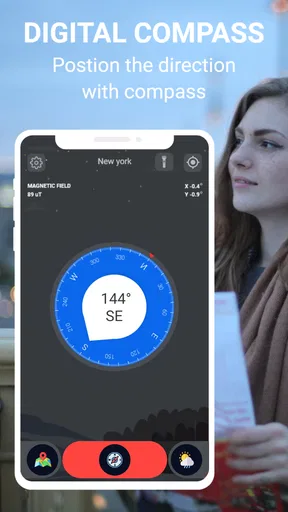
A compass works best when I can read it quickly, and the appeal here is a focused display rather than a screen full of map controls. A customizable compass face gives me a way to choose a look that suits my preference, while night mode is intended for dimmer conditions. Those touches can help me make a quick check without turning a short task into a settings session.
Still, a compass face is not automatically easy for everyone to interpret. If I have trouble distinguishing small labels, contrast, or changing directions on a screen, I should check whether the display is comfortable to read before relying on it outdoors. I would also avoid trying to interpret it while walking: stop somewhere safe, hold the phone steadily, and then check the direction. That small habit makes the reading easier to use and reduces distraction.
The Basics of Compass360
First things first, let's talk about what Compass360 actually is. It's a smart compass tool designed for both Android and iOS devices. It’s super user-friendly, so even if you're someone who thinks north is always up, you’ll find it a breeze to use. The app is all about helping you find your direction, literally, without any fuss.
Features That Stand Out
Now, let’s get into the nitty-gritty of what Compass360 offers. One of the coolest features is its magnetic and true north capabilities. Yep, it tells you both! Whether you’re hiking up a mountain or just trying to find your way around a new city, having both options is a game-changer.
That choice is most useful when I know which kind of direction a task calls for. For a basic orientation check, I can use the compass as a quick reference; when following a bearing from another source, I should make sure I am comparing like with like rather than switching between north settings without noticing. A compass is only helpful if I understand what its reading means in the context of the route I am following.
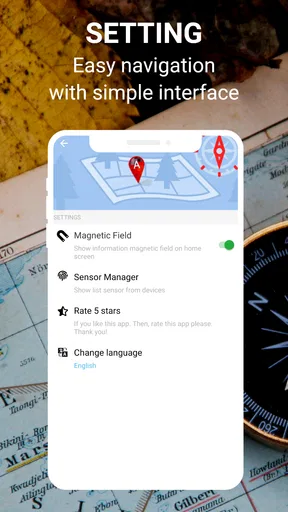
The app also boasts a clean and intuitive user interface. You’re not going to be bombarded with ads or unnecessary clutter. It’s just you and your compass, ready to go wherever life takes you. Plus, the app is lightweight, so it won’t eat up all your phone’s storage or battery life.
Worth Reading Before You Choose

EA SPORTS FC Mobile 26 Is a Bigger Football Game, but It Takes Time

Flipboard Shows What News Apps Must Do Beyond the Feed

Switching to Android Auto Means Rethinking Your Driving Routine

Google Calendar Makes a Crowded Week Easier to Manage

Ludo King Makes the Most of the Minutes Between Plans

Baby Panda World Brings Quick Play to Modern Phones, but Its Game Library Feels Busy
Motor and sensory considerations
Using a phone compass does involve holding the device and keeping it reasonably steady, so it may be awkward for someone with limited grip, tremor, or difficulty making small movements. I would not treat that as a personal failing or assume a compass reading will be effortless for every user. If holding the phone is uncomfortable, a companion can read the screen, or a physical compass with a larger, tactile form may be a better fit.
There is also a sensory trade-off. Night mode can make the screen more comfortable in low light, but it does not remove the need to look at a display. Someone who is sensitive to bright screens may prefer to make a quick check and put the phone away; someone who relies on spoken guidance should use a navigation option designed to provide it rather than assume this compass will speak directions. I would test the display in a safe, familiar place before depending on it in a demanding setting.
Using Compass360 in Real Life
So, how does Compass360 hold up in the real world? Pretty darn well, if you ask me. I took it for a spin during a weekend hike, and it was spot on. The app quickly locked onto the correct direction, and I didn’t have to fiddle with any settings. It was just open and go.
Another neat thing is the app’s ability to work offline. That’s right, you don’t need an internet connection to use it. This is perfect for those remote adventures where Wi-Fi is a mythical creature.
Situational access: when a compass is the right tool
Offline use changes how I would plan a simple outing: I can check direction even where a connection is unavailable, but I would still prepare a route and any essential information before leaving. A compass helps answer “which way am I facing?” It does not, by itself, tell me which path is safe, where a trail turns, or how to get around an obstacle. For those questions, an offline map or a dedicated navigation app is the more dependable companion.
For example, imagine I leave a trail to reach a viewpoint and then need to orient myself before returning to the marked path. I can stop, check the compass, and compare the direction with the route I planned. I would not follow a bearing blindly through unfamiliar terrain. The practical benefit is a quick orientation check, while the trade-off is that I remain responsible for interpreting it alongside landmarks and a map.
In a city, I might use it to see which way a street runs before choosing a direction, then switch to a map if I need turn-by-turn guidance. That division of labor is useful: a compass can be faster for a basic orientation question, while maps are better at showing destinations, streets, and route alternatives. I would not expect a compass to replace those tools just because it is convenient to open.
The Little Extras
One of the things I appreciated about Compass360 is the ability to customize the compass face. You can choose different designs and backgrounds to suit your style. It’s a small touch, but it makes the app feel more personal.
Additionally, there’s a night mode feature that adjusts the display for low-light conditions. Trust me, your eyes will thank you during those twilight hikes or when you’re trying to navigate a dimly lit street.
Practical trade-offs and alternatives
Customization is pleasant, but it is not the same as functional flexibility. I would choose the clearest face available to me rather than the most decorative one, especially if I expect to glance at the screen outdoors. A useful routine is to settle on a readable design before setting out, check the compass while stationary, and avoid making changes while trying to navigate. That keeps the tool simple when attention should be on the surroundings.
Compass readings can also be affected by the environment and the way a phone is held. Near metal objects or other sources of magnetic interference, I would treat an unexpected reading cautiously and check again after moving away. If the direction seems inconsistent, I would not keep walking on the strength of one glance; I would compare it with a map, landmarks, or another reliable reference. This is a sensible limitation of phone-based compass use, not a reason to rely on it less carefully.
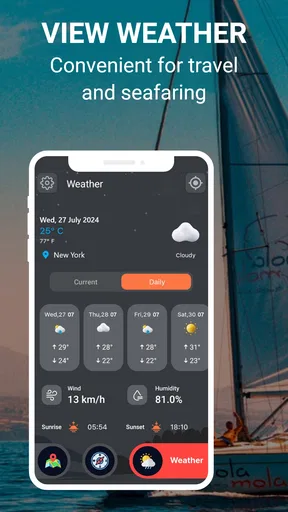
Compared with a standard weather app, Compass360 is more appealing when orientation is the main task and a compact tool is what I want. A dedicated weather app is the better choice when I need detailed forecasts or a clear breakdown of changing conditions. Likewise, a map app wins when I need a route, while a physical compass may suit people who want tactile controls or prefer not to use a phone screen. I would choose based on the job, rather than expect one app to cover every outdoor need.
Who should choose it—and who should look elsewhere
I can see this being useful for casual walkers, travelers who want a quick directional check, and people who already carry a map but like having a digital compass available. It is also a reasonable tool for someone learning how to orient themselves, provided they practice somewhere familiar before using it in a remote or time-sensitive situation. Its straightforward purpose is a strength when I do not want to navigate through a full mapping interface.
I would skip it as my only navigation aid for unfamiliar backcountry routes, or whenever I need accessible spoken instructions, detailed mapping, or a highly tactile interface. It is also not the right choice if I want weather to be the main event and need more than alerts. Those needs call for tools built specifically around them. For outdoor safety, I would carry an appropriate map and plan rather than treating a phone compass as a complete solution.
Remaining barriers and app details
Compass360 is a free weather app from Avn Global Application, and its current version is 1.2.3. It is rated for Everyone and has reached over one million installs. Its average rating is 3.3 from around 800 ratings, so I would regard that reception as mixed rather than assume every user will find it dependable in the same way. The app was released on May 1, 2024, and requires Android 7.0 or later on Android devices.
The practical questions I would ask before installing are straightforward. Will it work without a connection? The app’s offline compass use makes it suitable for that basic task. Is it a route planner? No: I would pair it with a map when I need directions to a destination. Can it replace a detailed weather service? I would not use it that way; the weather alerts are a useful extra, not a reason to abandon a dedicated forecast tool. And is the screen accessible for my needs? That depends on whether its visual compass display and phone-based controls work comfortably for me, so I would try it in a low-pressure setting first.
Final Thoughts on Compass360
All in all, Compass360 is a solid app that delivers exactly what it promises. It’s reliable, easy to use, and packed with features that make it a worthwhile download for both casual users and hardcore adventurers alike.
Whether you’re exploring new trails or just need a little direction in your daily life, Compass360 has got your back. It’s like having a trusty sidekick always ready to point you in the right direction.
If you’re ready to never lose your way again, go ahead and give Compass360 a try. It’s available for download on both Android and iOS. Happy exploring!
An inclusive verdict
My recommendation is qualified but positive: I would try Compass360 if I wanted a simple visual compass, liked the option to personalize its face, and understood that a compass is only one part of staying oriented. Its night mode and offline use make it more practical in particular situations, while the visual, hand-held interaction may be a barrier for some people. Choosing a clear display, testing it at home, and pairing it with the right map or forecast gives me a more realistic way to benefit from it.
For a quick check on a familiar walk or in town, it can be a convenient companion. For route finding, accessibility needs that depend on audio or tactile feedback, or serious weather planning, I would use a more specialized alternative. That is the fairest way to judge this app: a focused directional tool with helpful extras, not a universal navigation solution.
Pros
- Accurate and reliable directional readings.
- Simple and user-friendly interface.
- Lightweight
- won't drain battery quickly.
- Works offline without data connection.
- Customizable settings for better usability.
Cons
- Limited advanced features for experts.
- Ads can be intrusive at times.
- No integration with GPS maps.
- Some devices may experience calibration issues.
- Lacks support for wearable devices.
FAQs for Compass360: Smart Compass tool
What features does Compass360 offer?
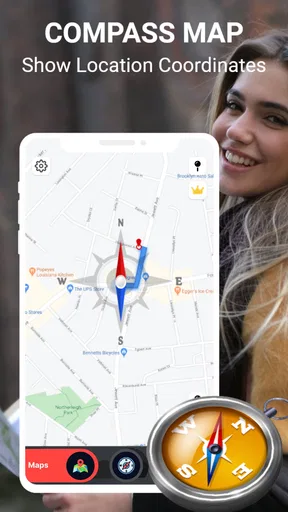
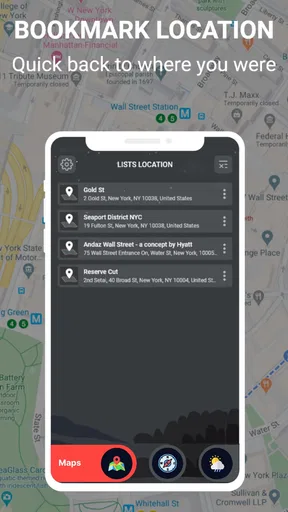
Compass360 offers a range of features designed to enhance your navigation experience. It provides accurate compass readings, GPS location tracking, and a user-friendly interface. The app also includes a map view, the ability to save locations, and a flashlight feature, making it a comprehensive tool for outdoor activities.
Is Compass360 accurate and reliable?
Yes, Compass360 is designed to provide highly accurate compass readings by utilizing the built-in sensors of your device. However, users should ensure their device is calibrated correctly and free from magnetic interference for optimal performance. Regular updates help maintain its reliability and accuracy.
Does Compass360 require an internet connection?
Compass360 primarily functions without an internet connection, as it uses your device's built-in compass sensor. However, some features like map view and GPS location tracking might require internet access for downloading map data and improving location precision.
Is Compass360 available for both Android and iOS?
Yes, Compass360 is available for download on both Android and iOS platforms. Users can easily find and install the app from the Google Play Store or the Apple App Store, making it accessible to a broad range of smartphone users.
Are there any in-app purchases or ads in Compass360?
Compass360 is free to download, but it may include ads to support development. Some additional features or an ad-free experience might be available through in-app purchases. Users can choose to upgrade for enhanced functionality and a seamless navigation experience.


